TL;DR
- A first-party LinkedIn signal is any action a prospect takes on your LinkedIn presence before you've said a word to them.
- First-party signals are the ones only you can see, which is exactly what gives them an edge over the public signals everyone else is acting on.
- There are 8 genuinely actionable ones, and most outbound teams are sitting on all of them and doing nothing.
- The 24-48 hour window is real. A signal from two weeks ago is cold.
- SalesRobot turns every signal on this list into a live outreach campaign without the manual work.
Your Pipeline Is Ignoring the Signals LinkedIn Is Already Sending You
Cold LinkedIn outreach gets a 10.3% reply rate on average.
Signal-based outreach gets 15-25%. SalesRobot users average 55%.
The difference isn't the message. It's the timing.
Every day, people are visiting your LinkedIn profile, commenting on your posts, registering for your events, sharing your content.
They're telling you they're interested. And most outbound teams are ignoring every single one.
That's what first-party LinkedIn signals are. Any action a prospect takes on your LinkedIn presence, your profile, your posts, your events, that shows direct interest before you've sent a single message.
The reason they matter more than third-party signals like job changes, funding rounds, and competitor follows is simple: everyone can see those. First-party signals are yours alone.
Here are the 8 that are actually worth acting on, and what to do with each one.
What Makes a Signal "First-Party" on LinkedIn?
Quick answer before the list.
First-party data means the activity happened on your surfaces and only you can see it.
Third-party signals are public. A job change, a funding round, a competitor follow. These are real signals, but every sales team with a data tool is acting on the exact same list.
First-party signals are different because nobody else has them. That's the edge.
The 8 First-Party LinkedIn Signals
Signal 1: Someone commented on your post
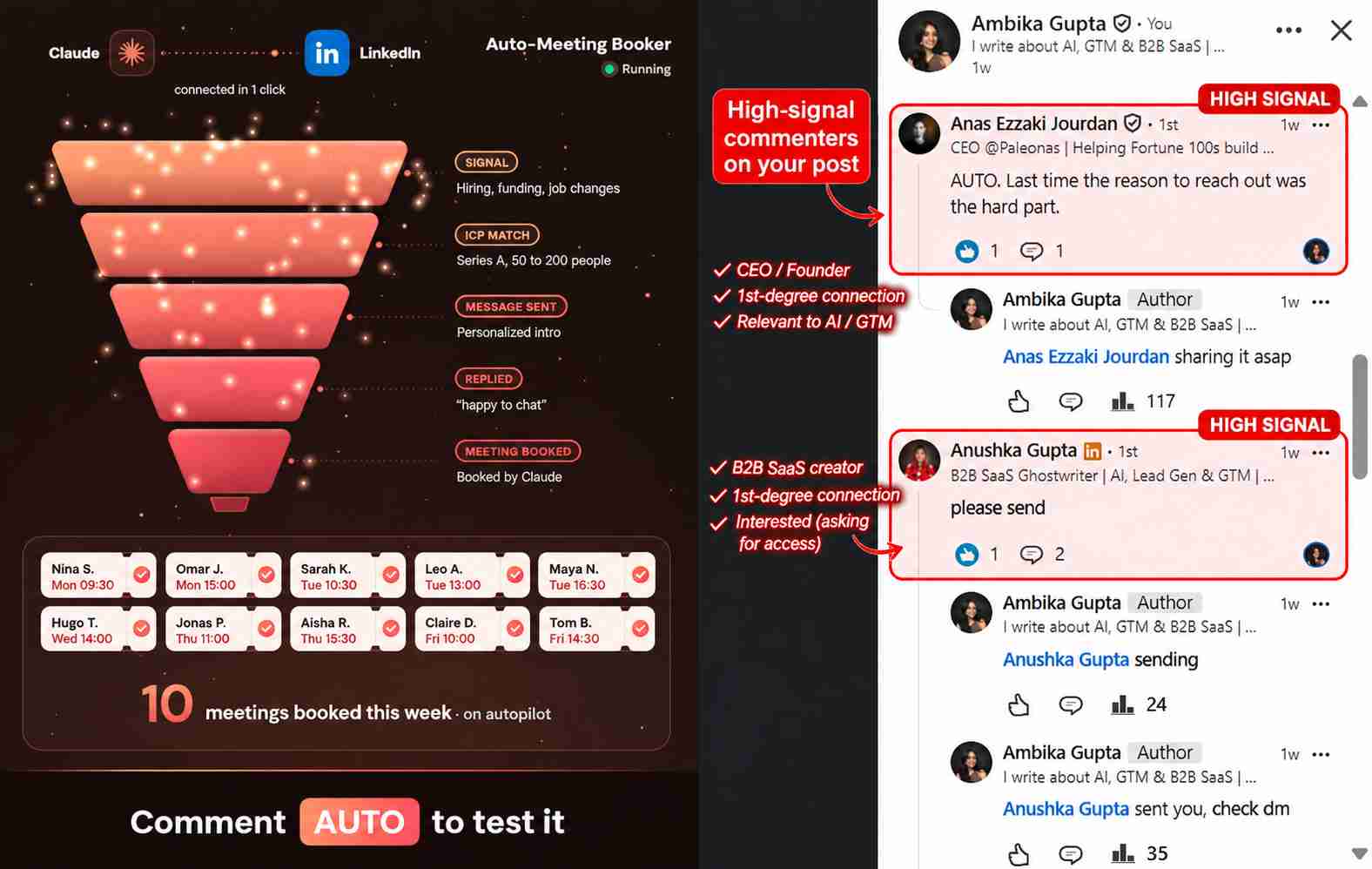
This is the highest-weight signal LinkedIn gives you.
They didn't scroll past. They didn't double-tap.
They read what you wrote, had a reaction, and took 30 seconds to respond publicly.
That's intent, familiarity, and a conversation starter all in one action.
Act within: 24 hours.
Message angle: Build on what they said. Quote it back to them, don't pitch.
Signal 2: Someone DMed you first
This isn't even a signal. It's a hand-raise.
They found you, read your profile, and decided you were worth reaching out to. The only question is how fast you respond.
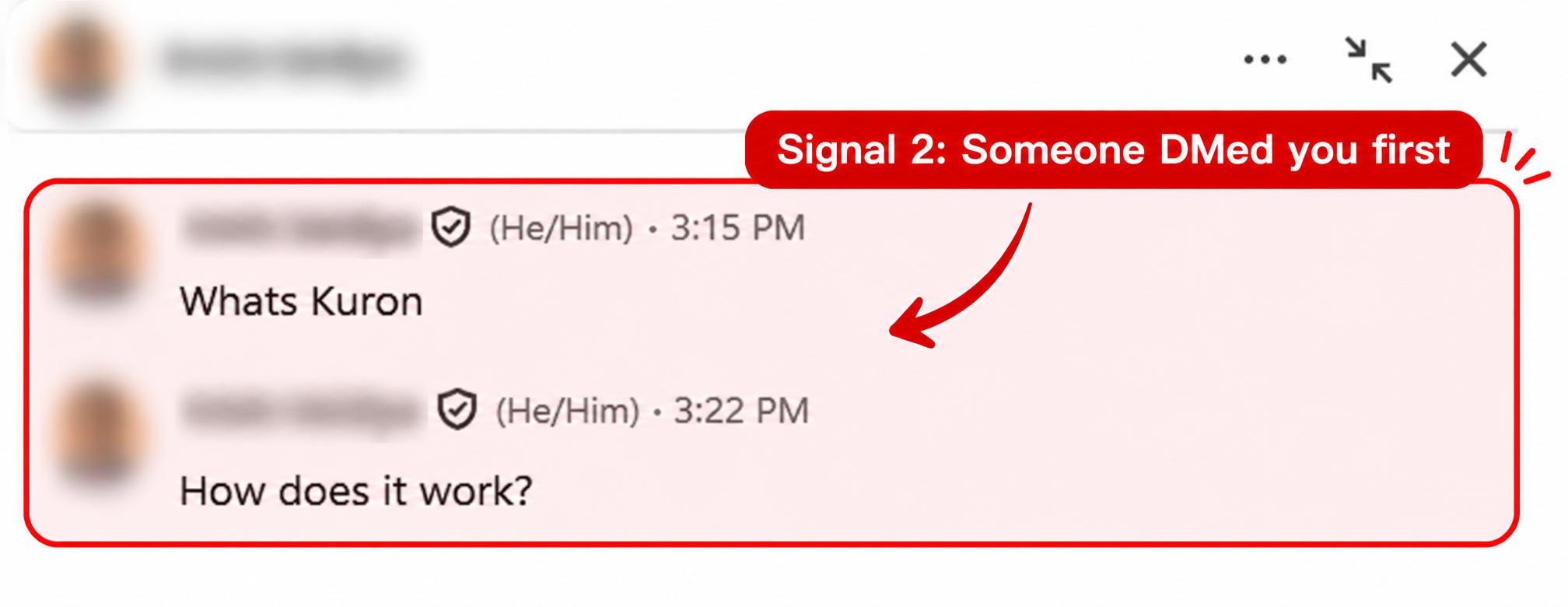
Act within: 1 hour. Reply speed here is the whole game.
Message angle: Continue the conversation. Ask one qualifying question. That's it
Signal 3: Someone viewed your profile more than once
A single profile view is noise. It could be anyone.
Two views from the same person in a short window is a pattern. They looked, thought about it, and came back for another look.
You need LinkedIn Premium to see the full list, but it's worth it for this signal alone.
Act within: 24-48 hours before the moment fades.
Message angle: "Figured I'd say hi." No need to mention the views.
Signal 4: Someone shared your post
They didn't just consume your content. They vouched for it to their entire network.
That's trust. And it opens one of the most natural, non-creepy conversation starters in outbound.
Act within: 48 hours.
Message angle: Thank them for the share and ask what resonated. Simple.
Signal 5: Someone registered for your LinkedIn event
They self-selected into your area of expertise, not just your content.
Event registrations convert well because the person is actively interested in the topic you're speaking about. And almost no one follows up with event attendees properly.
Act within: Day of the event or the day after, while the topic is still fresh.
Message angle: Reference the topic, not "saw you registered."
Signal 6: Someone replied to your LinkedIn newsletter
LinkedIn newsletter replies are the highest-intent passive signal the platform gives you.
These people didn't have to respond. They chose to engage with something you wrote well after you published it.
Act within: Same day, every time. These don't wait.
Message angle: Continue the thread they started. They opened the door.
Signal 7: A former customer started a new role at a target account
This is first-party because the relationship history is yours alone.
Nobody else has the context that you've already worked with this person and they've seen your product work. The 90-day new executive window is wide open, and you have an actual reason to reconnect.
Act within: First 30 days of their new role, before they're locked into inherited vendor decisions.
Message angle: "Congrats on the new role, we worked together at X, wanted to reconnect." Done.
Signal 8: Anyone who commented on a post relevant to your ICP
This is the play most people don't know exists.
You can import everyone who commented on any LinkedIn post: a thought leader's viral post about a pain you solve, a category discussion attracting your buyers, even your own older posts that blew up.
They've publicly declared interest in a topic. You have a specific, non-creepy reason to reach out. And you can do it at scale.
One of our accounts ran this exact play: 649 connection requests sent, 56% accepted, 35% replied, six months running, zero bans.
Act within: 48-72 hours while the post is still fresh in their feed.
Message angle: Reference the topic or the discussion, not the fact that you pulled their name from the comment thread.
How to Turn These Signals Into Campaigns

Spotting 8 signals a week is manageable manually.
Spotting 200 a week and acting on each one with a personalized message, a warm-up step, and a timed follow-up is where it breaks.
SalesRobot has a native import for every signal category on this list.
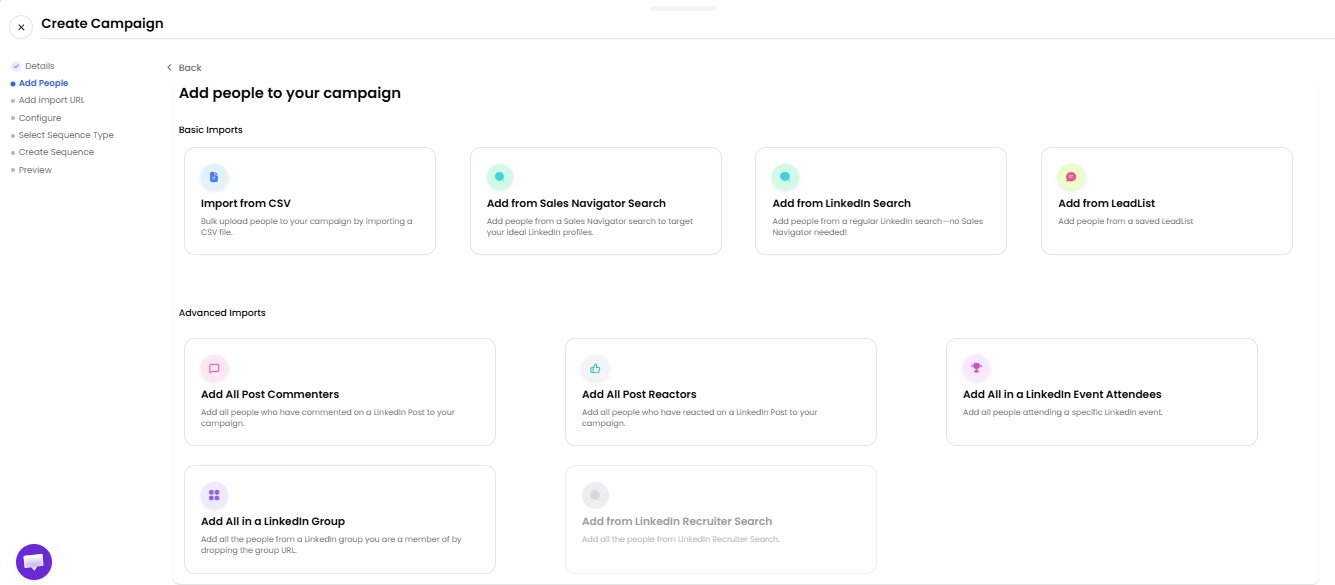
Add All Post Commenters handles Signal 1 and Signal 8. Paste any post URL and SalesRobot pulls every commenter directly into a campaign.
Add All in a LinkedIn Event handles Signal 5.
Add from LinkedIn Search or Sales Navigator handles Signals 3, 4, and 7.
Once your leads are in, here's how the execution layer works:
Smart Comments warms the account before your connection request fires. Your name shows up on their feed before you appear in their inbox. That's what gets SalesRobot users to a 51% connection acceptance rate.
AI Variables pulls each prospect's LinkedIn data and writes the signal-specific opening line automatically. A post-commenter campaign doesn't get "Hi [First Name], I wanted to reach out." It gets an opener that references what they were actually talking about.
AI Appointment Setter handles the replies. Copilot mode suggests a response you approve with one click. Autopilot mode runs the whole conversation and books the meeting into your calendar.
For teams tracking job changes in a CRM (Signal 7), the MCP and API route the trigger straight into a live campaign. No manual steps, no spreadsheet in the middle.
And for your highest-intent signals like a DM initiation or a repeat profile view, video and voice notes convert at 3x the rate of standard connection requests. Record once, send to hundreds.
The One Rule That Makes All of This Work
A signal without ICP fit is noise.
A like from a student researcher, a competitor checking you out, a recruiter browsing your profile. These look like signals. They're not.
Always pair signal weight with role fit and company fit before you move.
Signal plus fit equals act now.
Signal without fit equals ignore.
FAQ
What is a first-party LinkedIn signal?
A first-party LinkedIn signal is any action a prospect takes directly on your LinkedIn presence: your profile, your posts, your events, or your newsletter. First-party signals are only visible to you, which makes them more valuable than public signals every competitor can also act on.
What's the difference between first-party and third-party LinkedIn signals?
First-party signals happen on your surfaces and only you can see them. Third-party signals are public events like job changes, funding rounds, and competitor follows that anyone with the right tool can track. First-party signals indicate interest in you specifically. Third-party signals indicate interest in your category.
Do you need LinkedIn Premium to track first-party signals?
For profile views, yes. LinkedIn Premium shows you the full list of people who viewed your profile in the last 90 days, including repeat views. For post comments, shares, event registrations, and newsletter replies, standard LinkedIn notifications are enough.
How quickly should you act on a LinkedIn signal?
Most signals have a 24-48 hour window before they go cold. DMs and newsletter replies need same-day responses. Post comments and profile views are best acted on within 24 hours. The longer you wait, the colder the context gets for the person on the other end.
How do you turn LinkedIn signals into outreach campaigns at scale?
The manual version breaks above roughly 50 signals a week. SalesRobot has native import options for every signal type: post commenters, event attendees, LinkedIn search results, and Sales Navigator searches. Each import feeds directly into a campaign with AI-personalized openers, automated warm-up, and an AI Appointment Setter that handles replies and books meetings.
The signals are already there.
Every day, ICP-fit prospects are commenting on your posts, revisiting your profile, and registering for your events.
They're telling you something before you've said a word.

Wow your leads by cloning yourself and sending personalized videos and voice notes to each lead on LinkedIn.
If you don't reply to leads within 5 mins, your chances of converting them fall by 50%. Our AI replies on your behalf instantly! (and yes, you can train it)

Don't shoot in the dark. Get detailed analytics on what's working
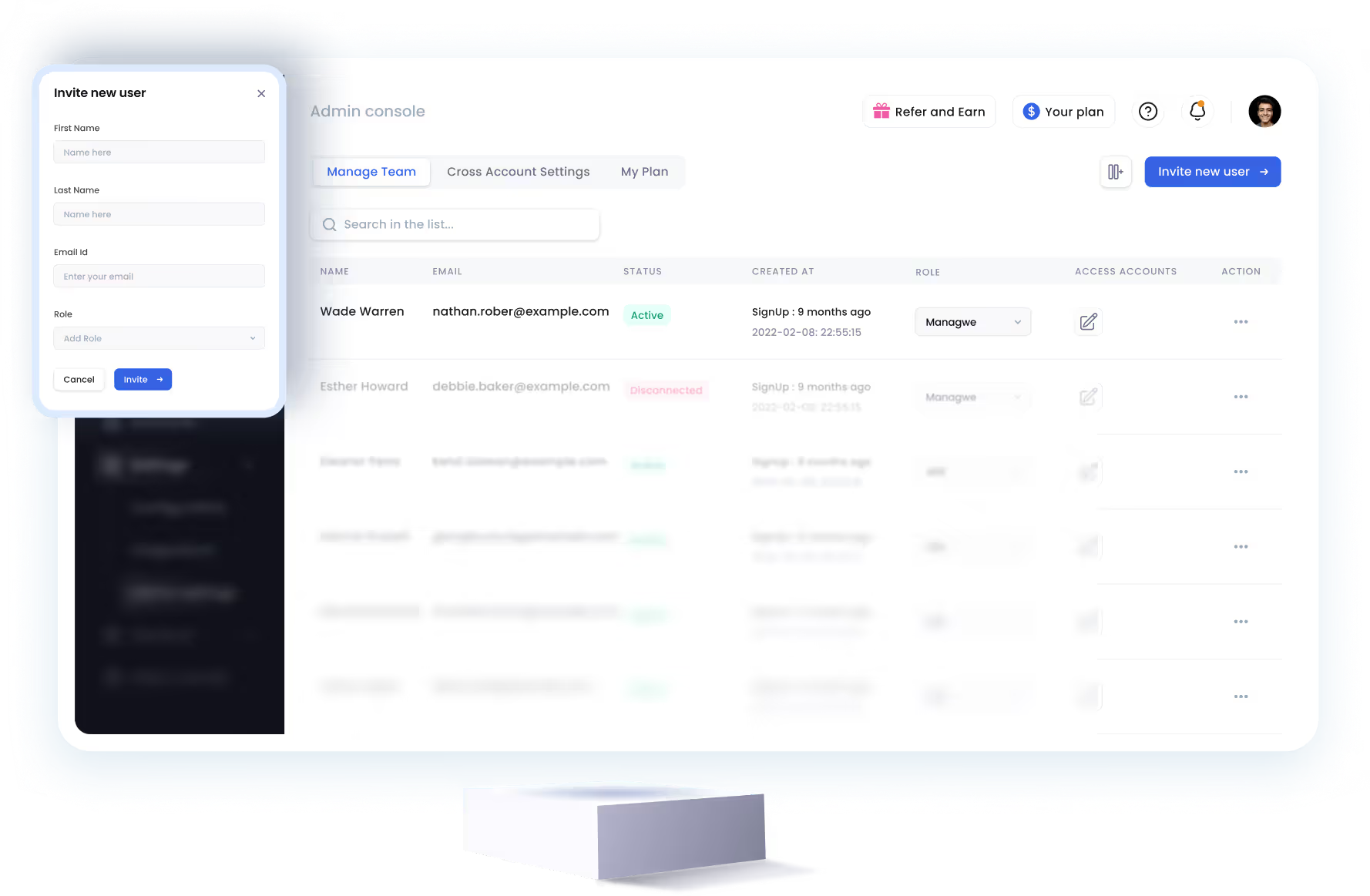
SalesRobot allows you to invite other team members, so that they can add their LinkedIn Account, run outreach campaigns and get amazing results just like you.



Trusted by 4100+ innovative B2B sales teams and lead gen agencies









Heading 1
Heading 2
Heading 3
Heading 4
Heading 5
Heading 6
Lorem ipsum dolor sit amet, consectetur adipiscing elit, sed do eiusmod tempor incididunt ut labore et dolore magna aliqua. Ut enim ad minim veniam, quis nostrud exercitation ullamco laboris nisi ut aliquip ex ea commodo consequat. Duis aute irure dolor in reprehenderit in voluptate velit esse cillum dolore eu fugiat nulla pariatur.
Block quote
Ordered list
- Item 1
- Item 2
- Item 3
Unordered list
- Item A
- Item B
- Item C
Bold text
Emphasis

Superscript
Subscript