.avif)
TL;DR
This guide covers the top LinkedIn automation tools for lead generation in 2026, with a breakdown of features, pricing, and compliance considerations.
Quick takeaway:
- Discover the top 10 LinkedIn automation tools for lead generation in 2026.
- Learn how LinkedIn bots automate connections, messages, engagement, and follow-ups.
- Explore five types of LinkedIn bots and their benefits.
- Compare features, pricing, and use cases of popular tools.
- Follow a simple 3-step guide to generate leads using LinkedIn automation.
- Understand LinkedIn automation risks, compliance, and account safety.
- Find out why SalesRobot is a strong option for businesses and lead generation agencies.
This blog is for you…
If you dream of having a consistent flow of leads via LinkedIn like the pros?
Or want to generate warm leads from LinkedIn on autopilot.
But,
You're not sure how to hunt leads.
Or, you're not sure if you have the budget for it.
Or maybe you don't have the time to reach out to people manually.
What if I tell you you can totally do this!
Yes, you!
With some LinkedIn Bots help!
LinkedIn bots are the not-so-secret weapon that can make lead generation on LinkedIn a breeze.
So, whether you run a small business in need of more leads ,
or
You do lead generation for your clients,
or
if you're chasing sales quotas, you're in the right place.
Here's what you'll take away from this blog:
🌟 First up, we'll answer the big question: What's a LinkedIn bot?
🌟 Next up, there's no rocket science here on how LinkedIn bots work.
🌟 I'll also talk about the 5 types of LinkedIn bots and their perks.
🌟 Next, I'll share tips for top-notch results on using LinkedIn bots for more leads [3-step guide].
🌟 Plus, we'll get our hands dirty on the Top 10 LinkedIn bots for lead generation.
🌟 Answering the burning question of Are LinkedIn bots allowed?
The LinkedIn bots we'll talk about are:
1. SalesRobot
2. MeetAlfred
3. Dux-Soup
4. Octopus CRM
5. PhantomBuster
6. Waalaxy
7. SocialPilot
8. Dripify
9. SidesMedia
10. LinkedHelper 2
And if you're short on time, here's a quick overview of the LinkedIn bots…

If you have time, take a seat, get comfortable, and explore LinkedIn bots together.

What is a LinkedIn bot?
I know you're a pro at what you do, whether it's:
But are you also a pro at generating leads using LinkedIn?
Didn't think so, or you'd be too busy swimming in connections to read this!
Well, you can be a pro real quick with LinkedIn bots.
What are LinkedIn bots, you ask?
Well, think of them as your personal assistants.
1. They do the hard work for you and you reap the benefits.
2. They perform actions like connect, like, and message.
3. They interact with your ideal audience on your behalf while you sit back and relax.

Your bot takes care of the repetitive stuff, growing your network, and building relationships as easy as a Sunday morning.
No! It's not cheating.
You're just using a smart hack to save time and energy.
Whether you want to generate more leads, find your dream job, or build your network , LinkedIn bots can help you achieve your goals.
Sounds awesome, right?
Well, it is!
Let's see how these work!
How do LinkedIn Bots Work?
There are 2 types of LinkedIn bots…
1. LinkedIn Chrome Extension Bots
They're quick and easy-to-use LinkedIn bots that work as browser extensions.
Just install the Chrome extension, and you're good to go.
Simple, right?
But easy stuff comes with more disadvantages than advantages.
Here are some that can't be ignored:

- Higher detection risk: Browser extensions can be easier for LinkedIn to detect.
- Requires your browser to stay active: Automation may stop when your computer sleeps or the browser closes.
- Limited flexibility: Extensions may have fewer features and integrations compared to cloud-based tools.
- Account safety concerns: Excessive or repetitive activity can increase the risk of LinkedIn restrictions.
2. Cloud-Based LinkedIn Bots
Your safest bet is to use a Cloud-based LinkedIn bot.
Why?

Cloud-based bots are like a VIP upgrade. They're more secure and more convenient.
Choose tools that have a proven track record and are widely used by well-known companies and professionals. Additionally, ensure that the tool uses encryption to protect your LinkedIn data and doesn't store your login credentials.
Look for tools that offer transparent activity logs, built-in rate limiting, and clear documentation of their compliance measures. Compliant tools use anti-detect tech to align with guidelines, reducing risks.
But they are a little
Now, before I talk about the top 10 LinkedIn bots, what exactly do you want to achieve using these bots?
Let's see which type of bot is the best one for you!
5 Types of LinkedIn Bots & Benefits of Each One
But the problem is no one really has that much time to focus on LinkedIn.
So, how do folks score LinkedIn leads even when they have no time for it?
Well, lucky us.
There are now various LinkedIn bots catering to different needs available in the market. Top tools range from $15 to $582 per month across different platforms, with several offering free lead generation tools for LinkedIn through trial periods or basic plans.
🤝 Want to connect with your prospects on autopilot? A bot can help you.
✉️ Want to write stellar cold LinkedIn messages? A bot can help you.
🚀 Want to engage with people's posts? You guessed it, a bot can help you here too.
PS: If you need all 3, SalesRobot will do it for you!
Here are the 5 types of LinkedIn bots you can try:
1. LinkedIn Connection Bots
"Let money do the work while you sleep" – a tip from savvy investors.
I'm a believer, and I treat LinkedIn like an investment (you should too!).
These LinkedIn bots are also an investment. The bots keep on working while you sleep.
Imagine growing your LinkedIn network while you sleep.
Here are 3 reasons to use these bots:
- Grow your network automatically by sending connection requests to relevant prospects.
- Save time by automating repetitive outreach while you focus on other tasks.
- Reach your ideal audience and build relationships with potential clients or business partners.
2. LinkedIn Message Bots
Ever feel overwhelmed by messages – invites, requests, leads?
Sorting through them takes time.
Enter LinkedIn Message Bots.
They do the heavy lifting, clearing the clutter and highlighting what matters most.
But remember, the LinkedIn bot will only reach out to people you're connected with.
Here are 3 reasons to use these bots:
- Automate follow-up messages to keep conversations moving without manual effort.
- Save time by handling repetitive messaging tasks at scale.
- Nurture leads consistently and ensure important prospects don't slip through the cracks.
3. LinkedIn Engagement Bots
Ever seen some posts by a few LinkedIn creators keep popping up in your LinkedIn feed.
Well, LinkedIn is all about engagement, and the LinkedIn algorithm loves them.
You've got to engage with others regularly, and do you really have the time to engage with 50+ posts daily?
That's where LinkedIn Engagement Bot comes in.
Here are 3 reasons to use these bots:
- Engage with posts automatically through likes and comments to stay active on LinkedIn.
- Increase your visibility by interacting with relevant creators and potential prospects.
- Build stronger relationships through consistent engagement with your target audience.
4. LinkedIn Post Bots
Not only ads, or campaigns drive traffic. But content also creates an impact and drives traffic.
I enjoy writing my LinkedIn posts, but if you don't, try LinkedIn Post Bots.
You can craft engaging content effortlessly and add a human touch when needed.
Here are 3 reasons to use these bots:
- Create engaging LinkedIn posts effortlessly.
- Save time with automated content creation and scheduling.
- Increase visibility and drive more traffic through consistent posting.
5. LinkedIn Sales Bots [All-in-One]
"I just closed a deal while watching Netflix," said Mike – a LinkedIn lead generation agency owner from Minnesota (also a SalesRobot customer!)
These bots automate repetitive tasks so you can focus on building relationships and sealing deals.
These bots will truly make you a "One-man team."
However, choose tools with a proven track record and encryption to protect your LinkedIn data. Compliant tools use anti-detect tech to align with LinkedIn's guidelines, reducing risks.
Here are 3 reasons to use these bots:
- Automate LinkedIn and email outreach from one platform.
- Save time with automated follow-ups and personalized messaging.
- Manage lead generation, nurture prospects, and close deals more efficiently.
That's a wrap for this section.
Next up, let's explore and find your perfect bot match to help you get more leads.
How to use LinkedIn bots to get more leads? [3-step Guide]
4 years ago, LinkedIn was just a networking platform.
But the landscape changed quickly, and today, it's the number 1 lead-generation platform, especially for B2B businesses.
While everyone shares the number of leads they're getting, no one really ever shares what tool they're using, right?
So, here's the LinkedIn Bot I use (and let's be honest, it's the one I've created too!):
SalesRobot is a LinkedIn automation tool. It has the capability to:
But that's not the best part.
The best part is it can scrape LinkedIn Search URLs and LinkedIn Sales Navigator and fetch 2500 leads every day.
Here's how to do it:
1. Login via your account
2. Click "Campaigns" and "Create Campaign"

3. Select "I'm an advanced user"

4. Select "Add from Sales Nav Search"

5. Now, open LinkedIn sales navigator - use filters and create a list of your ideal clients. Keep the search result less than 2500.
.jpeg)
6. Copy the Sales nav URL and paste it into SalesRobot.
.png)
7. Follow the next steps and create a sequence of messages to be sent to these leads.

8. Save and Start the campaign
It's that easy. In the next 24 hours, you'll have an inbox full of clients asking more about what you have to offer.
Don't worry if you don't have a Sales Nav subscription.
We got your back.
You can still run campaigns using LinkedIn Search URL, LinkedIn group, and events.
Sounds interesting?
Well, SalesRobot also offers a 14-day trial - no credit card required. So you can try it, completely free, no strings attached!
Top 10 LinkedIn Lead Generation Tools For 2026:
Not every tool sold for $100 delivers a good return on investment.
You know it. I know it.
And this is true for LinkedIn bots, too.
Some tools don't have the features you need.
Some tools don't work as advertised.
Some tools are too tough to use.
You're looking for a better solution, aren't you?
Well, if that's the case, here are the Top 10 LinkedIn tools for lead generation that are worth investing in:
1. SalesRobot
Why SalesRobot?
✅Prioritizes account safety — cloud-based, runs on LinkedIn mobile-app APIs with dedicated residential IP rotation, reducing ban risk to near-zero (no Chrome extension required)
✅Send 200+ Messages a Day
✅Bypass LinkedIn connection limit
✅Integration with your favorite CRM
✅AI-powered campaign for beginners
✅Collection of LinkedIn message templates
✅Automatic follow-up till the prospect replies
✅Multi-Channel (Linkedin + Email) campaigns
✅Hyper-personalized messages with personalized gifs and memes
✅AI Voice Clone - Record once, send personalized voice notes at scale (3x more replies)
✅ AI Video Messages - Send personalized video messages to stand out in crowded inboxes
✅ AI Appointment Setter - Auto-responds to prospects and books meetings on your behalf
✅ AI Variables - Advanced personalization that pulls real data from LinkedIn profiles (beyond basic merge tags)
✅ Smart Reply Detection - Automatically stops sequences when prospects reply
SalesRobot stands out with ready-made templates, a smart inbox, and image/GIF personalization.

Who should use it?
1. Small and medium businesses that want to get more customers from LinkedIn.
2. Lead generation agencies that want to generate more warm leads for their clients on autopilot.
LinkedIn automation tools range from $15 to $582 per month depending on features and capabilities. SalesRobot offers competitive pricing with various plans to fit different business needs.
Note: These are monthly prices.
P.S. Additional 35% Discount: Annual subscription
Whitelabel Monthly Plan:
Annual fee: $1200/year for starting the Whitelabel.
Note: These are monthly prices per LinkedIn account.

Before you commit, here's a completely free 14-day trial. No credit card required.
2. Meet Alfred
Why Meet Alfred?
✅Personalize at scale
✅Multi-Channel campaigns
✅LinkedIn scraping and CRM sync
✅Collection of LinkedIn message templates
Meet Alfred stands out with its Campaign Manager, Alfred CRM, and Email Campaign Sequences.
Who should use it?
A valuable tool for businesses, lead generation and marketing agencies, and B2B tech startups.
Pricing:

Before you buy this, make sure to know about Meet Alfred alternatives.
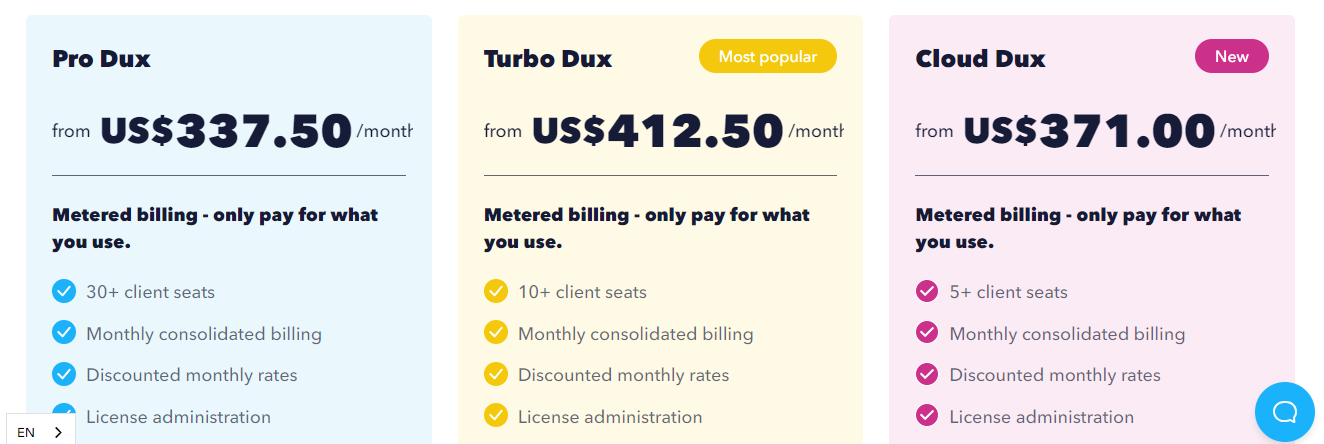
3. Dux-Soup
Why Dux-Soup?
✅Sync with LinkedIn Recruiter and Sales Navigator
✅Multiple campaign setup
✅CRM Integration
Dux-Soup stands out with its low-cost plans and its ability to export leads into CSV and integrate CRM.
Who should use it?
Small business owners or marketing agencies who are looking to generate leads via LinkedIn.
Pricing:

4. Octopus CRM
Why Octopus CRM?
✅Build a LinkedIn funnel
✅Streamlined outreach
✅Campaign management
✅Zapier and HubSpot Integration
Octopus CRM stands out with its skill endorsement feature.
Who should use it?
B2B sales representatives and Sales managers who are looking to add more leads to their pipeline.
Pricing:
.jpeg)
5. PhantomBuster
Why PhantomBuster?
✅Automate campaign across web platforms
✅Scrapes data from websites
✅Automatic follow-up
✅Data enrichment
Standout features include LinkedIn Profile Scraper and LinkedIn Message Sequences.
Who should use it?
Small to medium-sized businesses who want new leads for their business.
Pricing:
.jpeg)
PhantomBuster's a great tool but is PhantomBuster the solution to your lead generation problems?
6. Waalaxy
Why Waalaxy?
✅ Automated LinkedIn connection requests and follow-ups
✅ Multi-channel outreach (LinkedIn + email) in one workflow
✅ 99+ pre-built campaign sequences
✅ CRM integration via HubSpot, Pipedrive, and Zapier
Waalaxy stands out with its visual sequence builder, email finder powered by Dropcontact, and smart reply detection that automatically pauses sequences when a prospect responds.
Who should use it?
Solopreneurs, SDRs, and small-to-mid-sized sales teams who want a straightforward LinkedIn + email automation tool without a steep learning curve.
Pricing:

7. SocialPilot
Why SocialPilot?
✅Monitor social media accounts performance
✅Content scheduling, team collaboration
✅Single inbox to manage the clutter
✅Generate posts with AI
SocialPilot stands out with features like scheduled posts, engagement, and content suggestions.
Who should use it?
Marketing agencies and social media managers who manage social media accounts, create content, and generate leads via content.
Pricing:

8. Dripify
Why Dripify?
✅Exports lead to CSV
✅Detailed analytics dashboard
✅Manage team members easily
✅Create a campaign using CSV file or LinkedIn search URL
Standout features include drip campaigns, data export, and lead responding.
Who should use it?
Business owners, marketers, and recruiters who're looking for new leads and want to scale their business.
Pricing:

9. SidesMedia
Why SidesMedia?
✅All-in-one social media powerhouse
✅Tailored solutions for each platform
SidesMedia stands out with its budget-friendly solutions.
Who should use it?
Social media managers, marketers, and creators who manage multiple social media accounts.
Pricing:
.jpeg)
10. LinkedHelper 2
Why LinkedHelper 2?
✅Inbuilt CRM
✅Scrapes data from LinkedIn
✅Advanced limits and working hours
✅Autoresponder and detailed analytics
LinkedHelper 2 stands out with features like autoresponder, message group members, and export/manage contacts.
Who should use it?
Sales development and business development representatives.
Pricing:
.jpeg)
Free Chrome Extension for Lead Generation Options
Looking for budget-friendly LinkedIn tools? Several chrome extension for lead generation options exist, though they come with limitations compared to cloud-based solutions.
Popular free LinkedIn lead extractor chrome extensions include basic profile scrapers and connection request tools. However, remember that these browser-based tools carry higher risk of detection and stop working when your computer sleeps.
For businesses seeking free lead generation tools for LinkedIn, most premium tools offer free trials ranging from 7-14 days, allowing you to test features before committing to paid plans.
Are LinkedIn bots allowed?
LinkedIn's policies strictly prohibit unauthorized automation. Using LinkedIn bots can lead to permanent account bans. According to 2026 LinkedIn updates, violations result in serious consequences for users.
However, compliant tools use anti-detect technology to align with LinkedIn's guidelines and reduce risks. When choosing automation tools, you need to prioritize safety and compliance.
Here's what to look for in safe LinkedIn automation tools:
The safest approach is to use tools that respect LinkedIn's architecture and provide clear documentation of their compliance measures. Remember, LinkedIn automation pricing ranges from $15 to $582/month across different platforms, but cost shouldn't be your only consideration when account safety's at stake.
I get asked this question about 4-5 times a day.
And my answer remains the same:
"Yes, LinkedIn bots are allowed."
The tools are being used because LinkedIn lost a legal battle against data scraping.
The order pointed out that scraping publicly available data is legal and that LinkedIn has no grounds to block third-party providers from scanning its user profiles for their purposes.
Now, LinkedIn can't ban these tools, but you still need to use LinkedIn bots within their guidelines. If you don't, your account will get banned.
Some bots do follow guidelines, and some don't.
If you're looking for a safe LinkedIn bot that operates within LinkedIn's guidelines and lets you automate outreach effectively, SalesRobot is a solid option.
Which is the best LinkedIn lead generation tool for small-medium businesses or agencies?
I'm going to be a bit biased, but I'm backing my claims with facts.
I think one of the best bots out there is SalesRobot.
Here are the top 5 reasons why it stands out:
1. Your account stays protected as it's a cloud-based tool working within LinkedIn's safety guidelines.
2. You can hyper-personalize messages and add custom content to boost your response rates.
3. You can run campaigns even if you're not technical using their AI-powered setup process.
4. You can integrate with popular CRMs, or use their built-in CRM system.
5. You can manage multichannel outreach combining LinkedIn and email in one platform.
What makes it stand out?
Well, there are many reasons, but what helps you most?
It's the ready-made templates that mean you don't need a copywriter to create your message sequences. You can use their proven templates and get better response rates.
The other benefit is their smart inbox that combines LinkedIn and email messages. No need to juggle multiple tools.
How much does it cost?
Based on current 2026 pricing, LinkedIn automation tools range from $15 to $582 per month depending on features and volume.
SalesRobot offers competitive pricing with their basic plans starting around industry standards.
For agencies, they provide whitelabel solutions with custom pricing options.
If you're interested, they offer a free trial. No credit card needed to get started!
FAQ: LinkedIn Bot Lead Generation
Can I send voice and video messages with a LinkedIn bot?
Yes — SalesRobot lets you send AI-personalized voice notes and video messages on LinkedIn at scale. You record once and each lead receives a personalized version, with users reporting 40%+ reply rates. This is a feature most competitors like Waalaxy, Dripify, and Dux-Soup don't offer natively.
Is there a white label LinkedIn lead generation tool for agencies?
Yes. SalesRobot offers a whitelabel program letting agencies resell the platform under their own brand — over 110 agencies already run it, many earning $10k+/month. Whitelabel monthly pricing scales by account volume, from $99/account (1-10 accounts) down to $37/account (400+).
Can you use LinkedIn for lead generation for free?
Yes — though free accounts get zero InMail credits, you can send unlimited free messages to LinkedIn Premium members with Open Profiles enabled (no credits consumed), plus message group members and event attendees without connection limits. You can also send unlimited free messages to LinkedIn Premium members with Open Profiles enabled, and message group members without connection limits.
What is the LinkedIn connection limit for 2026?
LinkedIn enforces a limit of 100-200 connection requests per week for most accounts. Your invitation cap resets exactly seven days after you send your first connection request. Sales Navigator users typically get 150-250 requests per week with enhanced features.
How does a LinkedIn lead extractor chrome extension work?
Chrome extensions for LinkedIn lead extraction work by scraping publicly available profile data from LinkedIn pages. However, these browser-based tools are easily detected by LinkedIn and stop working when your computer goes to sleep, making cloud-based solutions safer.
Does LinkedIn allow automation bots?
LinkedIn's Terms of Service prohibit unauthorized automation, but compliant tools using anti-detect technology can operate within guidelines. Choose tools with proven track records, encryption, and transparent activity logs to minimize account risks.
And that's a wrap!
That's all for now.
Until next time,
Good luck!

Wow your leads by cloning yourself and sending personalized videos and voice notes to each lead on LinkedIn.
If you don't reply to leads within 5 mins, your chances of converting them fall by 50%. Our AI replies on your behalf instantly! (and yes, you can train it)

Don't shoot in the dark. Get detailed analytics on what's working

SalesRobot allows you to invite other team members, so that they can add their LinkedIn Account, run outreach campaigns and get amazing results just like you.
.avif)


Trusted by 4100+ innovative B2B sales teams and lead gen agencies

.avif)

.avif)




.avif)


Heading 1
Heading 2
Heading 3
Heading 4
Heading 5
Heading 6
Lorem ipsum dolor sit amet, consectetur adipiscing elit, sed do eiusmod tempor incididunt ut labore et dolore magna aliqua. Ut enim ad minim veniam, quis nostrud exercitation ullamco laboris nisi ut aliquip ex ea commodo consequat. Duis aute irure dolor in reprehenderit in voluptate velit esse cillum dolore eu fugiat nulla pariatur.
Block quote
Ordered list
- Item 1
- Item 2
- Item 3
Unordered list
- Item A
- Item B
- Item C
Bold text
Emphasis

Superscript
Subscript