.avif)
TL;DR:
- LinkedIn Account-Based Marketing flips traditional marketing on its head: instead of flooding sales with low-quality MQLs, you target a small set of high-value accounts and engage their decision-makers directly.
- The payoff when sales and marketing align is real: a 208% increase in marketing-generated revenue and 27% faster profit growth over three years.
- It runs on three core steps: identify your target accounts (Sales Navigator is the tool for this), present to them with personalized outreach instead of generic blasts, and close by tying your offer to each account's specific pain points.
- Seven tactics amplify that: align sales and marketing, research obsessively, use Sales Navigator, warm prospects up before reaching out, personalize every message, retarget with LinkedIn ads, and track what's working.
- Yes, ABM gets expensive (premium ad formats, competition for decision-makers, custom content), but you can keep costs down by narrowing your account list, leaning on free organic tools, and running shorter test campaigns.
- SalesRobot handles the heavy lifting: hyper-personalized connection requests, AI voice and video notes (up to 50/day on all paid plans), an AI Appointment Setter that qualifies and books meetings, and cloud-based mobile-API architecture that keeps your account safe. 14-day free trial, no credit card.
This blog is for you…
If your marketing efforts seem to fall short, even though you're doing all the work.
OR, you are probably getting bad quality leads.

The problem is simple → Traditional marketing is too broad.
It targets everyone but connects with no one.
This costs you time, money, and real opportunities.
That's where LinkedIn account-based marketing (ABM) and account-based targeting comes in.
In this blog, I'll show you:
🤖What is Account Based Marketing.
🤖How to use it on LinkedIn and 3 simple steps to get started.
🤖And 7 proven Account Based Marketing tactics to get real results.
No wasted effort. No guessing. Just results.
Ready to dive in?
Let's get to the basics first.
What is Account Based Marketing?

Before I dive into LinkedIn account-based marketing, let's be real about traditional marketing.
Your Marketing team focuses on quantity over quality. They flood Sales with Marketing Qualified Leads (MQLs)—most of which never convert.
And that's when the Sales team's rant begins.
"I wasted 30 minutes on this guy. He's clearly not a qualified lead!"
Sales ends up chasing dead ends, wasting hours on unqualified leads instead of closing deals.
The result?
This is exactly where Account-Based Marketing (ABM) flips the script.
Account-based marketing is a strategic approach that focuses on targeting and engaging specific high-value accounts or companies rather than a broader audience.
It's a prospecting technique on LinkedIn where you identify a group of individuals within the same company, and then engage with them through email and social media platforms.
Instead of targeting everyone, you focus on specific high-value accounts that actually matter to your business.
Sales and Marketing team up to:
No wasted effort. No chasing the wrong leads.
The result?
MQL = SQL.
Marketing delivers qualified leads that Sales can close. High-performing organizations achieve 20%+ MQL to SQL conversion rates, while organizations with aligned sales and marketing see a 208% increase in marketing-generated revenue and 27% faster profit growth over three years.
It's alignment at its best.
Keep reading, and I'll show you…
Why choose account-based marketing for LinkedIn?
✅ABM gets marketing and sales teams on the same page, working toward the same goals.
✅With LinkedIn ABM, you don't waste time on generic messaging. Instead, you zero in on specific accounts and tailor content that speaks directly to their needs.
✅Even if you're not connected to your LinkedIn account, LinkedIn InMails allow you to contact key decision-makers. LinkedIn InMail is essentially your VIP pass to slide into anyone's inbox on the platform, even if you're not connected.
✅LinkedIn's sponsored content ensures your ads show up in the feeds of your target audience—seamlessly blending with the professional content they're already consuming.
✅Tailored messaging resonates. When you connect with the right audience using personalized campaigns, engagement goes through the roof.
✅LinkedIn ABM focuses on high-value accounts that matter most. Fewer wasted efforts mean higher chances of closing deals.
✅When you consistently deliver valuable, professional content to the right people, you start to build serious trust. You position your brand as an authority in the industry, making you the go-to choice when your prospects are ready to buy.
✅By focusing on the right accounts from the start, you speed up the sales process and build strong, long-lasting relationships that help grow your business over time.
So, are you ready to learn how to do ABM on LinkedIn?
How to do ABM on LinkedIn?
To succeed with LinkedIn Account-Based Marketing, you need to focus on three essential steps.
Here are the steps to get it right:
#1 Identify target accounts
The first step is figuring out which companies are the best fit for what you offer.
Think about "What does your perfect client look like?"
Not sure where to start?
Look at your current clients. They're your best data source and a great example of who you should be targeting to scale your business.
OR
Use LinkedIn Sales Navigator to search for your ideal target companies.
This approach ensures you're not wasting time on companies that aren't a good fit.
You can use this to filter clients based on:

This is the most critical step because ABM is all about quality, not quantity.
#2 Present to them
Okay, I assume you've got your target accounts now. Now what?
The next step is to engage and there are 3 ways you can do that:
1/ Manually reach out to everyone.
2/ Blast a generic message.
3/ Send automated personalized messages
#1 and #2 are a NO go because decision-makers get bombarded with the same dull, robotic messages every day.
So,
You need to engage smartly.
You need to speak directly to their challenges.
You must skip the sales pitch and instead focus on building a connection.
You must share content that matters—like case studies, industry insights, or success stories they can relate to.
You want each company to feel like you're talking directly to them, not just sending out the same generic message to everyone.
This personal touch helps you stand out and actually make a real connection.
Now, I know what you're thinking: "That sounds like a ton of work." And you're right—doing it manually would take forever.
But here's the good news: SalesRobot can handle this for you.
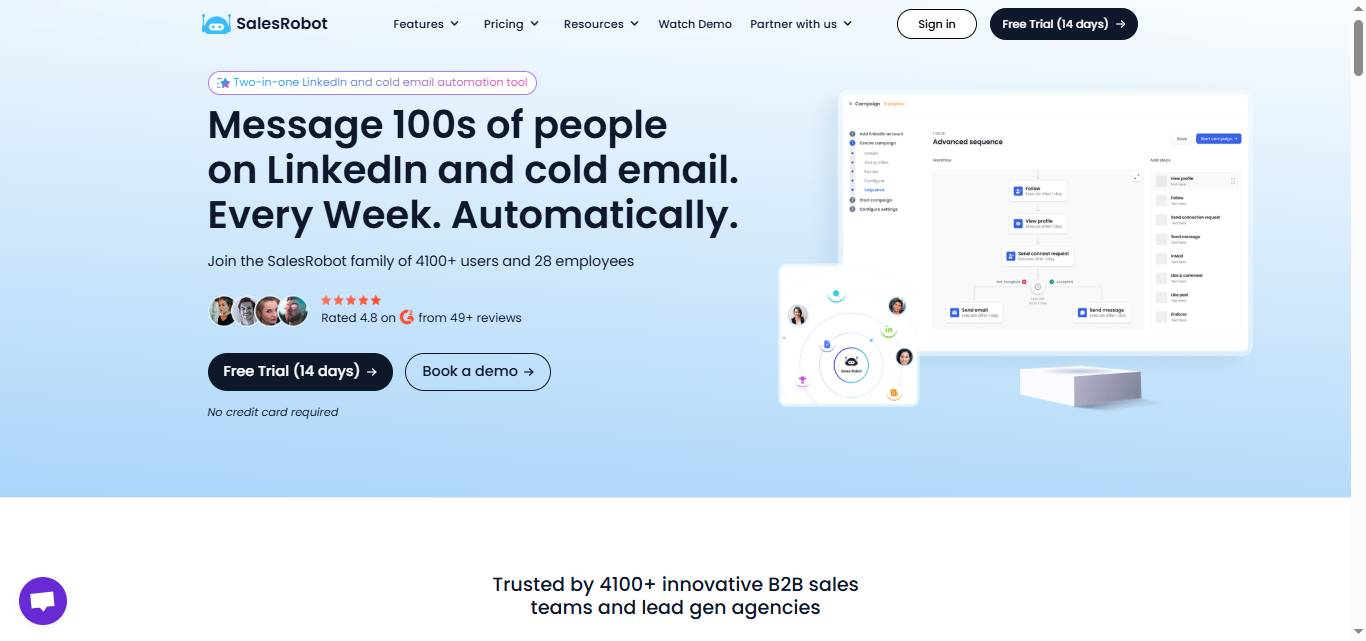
It's an awesome LinkedIn automation tool that lets you send super personalized messages on autopilot and more, just like this one:

But what makes SalesRobot truly unique is its voice AND video notes feature. SalesRobot lets you send AI-personalized voice notes AND personalized video messages on LinkedIn at scale — you can even clone yourself so every lead gets their own personalized video. Both are available on all paid plans (up to 50/day), something competitors like Expandi, Waalaxy, and Dripify don't offer.

Why should you send voice notes?
Perfect for busy executives - Decision-makers can listen while multitasking, making it easier to consume your message
SalesRobot does the heavy lifting so you can focus on what really matters: building relationships and closing deals.
#3 Close the deal
Once you've built a relationship and generated some interest, it's time to talk business.
When you do, focus on the specific pain points your product or service can solve.
Make your offer crystal clear and show how the benefits directly address the needs of the target account.
Continue using a personalized approach as you move forward.
Address any objections or concerns they might have and guide them through the next steps.
Whether setting up a demo, sending a proposal, or finalizing details, it's important to show how your solution best fits their unique business needs.
But managing multiple conversations and qualifying prospects in bulk is not easy.
That's where SalesRobot's AI Appointment Setter becomes invaluable. This AI agent:
The AI Appointment Setter ensures that by the time prospects reach your calendar, they're already warmed up, qualified, and ready to have a serious conversation about your solution.

That's what will help you close the deal effectively with ABM!
Now I know it's easier said than done.
So here are...
7 Account-based marketing tactics for LinkedIn
These strategies will help you amplify the 3-step process and make your LinkedIn ABM so much more effective:
1️⃣Marketing + Sales together
When marketing and sales teams work together, it's not just about closing deals; it's about creating a unified experience.
When both teams are aligned, everything—from messaging to approach—is more targeted.
You're not just sending out random messages.
This partnership ensures that your efforts are personalized and more effective, boosting engagement and conversion rates. Research shows that 77% of companies experience revenue growth due to ABM efforts, and 40% of businesses are working to balance ABM with traditional demand generation strategies.
You create a seamless experience that meets each account's specific needs.
2️⃣Research, research, research!
The foundation of ABM is research.
If you're not sure where to start, take a look at your existing clients—they're a great example of the perfect clients you could scale.
Knowing your target accounts inside out allows you to craft messaging that feels personal and relevant.
Dive into company updates, social media, LinkedIn profiles, and anything that gives you a clearer picture of the people and the business.
The better your research, the more your message will resonate. By 2025, 84% of marketers report leveraging AI and intent data to enhance personalization within their ABM campaigns.
3️⃣LinkedIn Sales Navigator to the rescue
LinkedIn Sales Navigator is the best database tool out there.
Its advanced search filters let you find key people and influencers within your target accounts.
But, if manually reaching out to hundreds of prospects overwhelms you, then SalesRobot can be your friend.
SalesRobot automates the process, scraping LinkedIn Sales Navigator to pull up to 2,500 prospects daily.
All you need to do is:


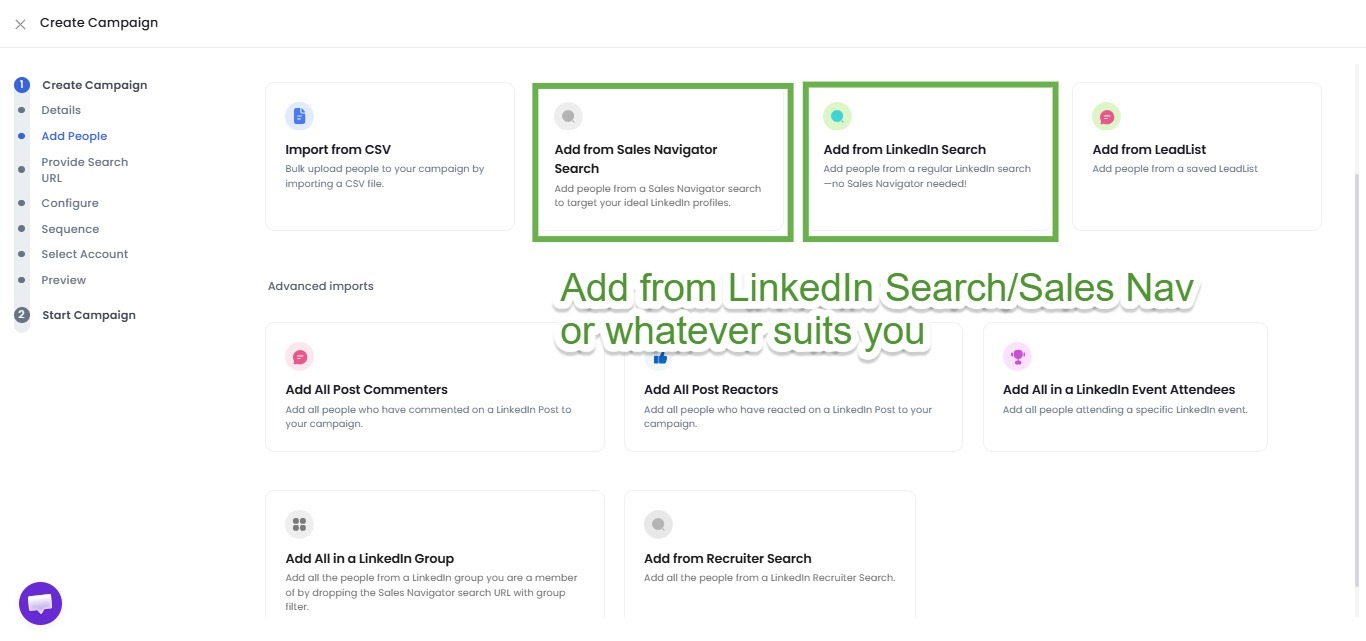
Easy, right?
No need to spend hours on manual targeting, it takes care of that for you.
It'll make sure you're still connecting with your ideal clients.
This way, you get more time to focus on your business strategy and relationship-building.
4️⃣Warm up before reaching out
Cold messaging can feel too pushy, especially on LinkedIn.
Take the time to warm up your prospects before making that direct contact.
Engage with their content by commenting or liking their posts or sharing something they might find valuable.
SalesRobot can help you auto-comment on LinkedIn posts, using images and GIFs to make your interactions feel more personal and conversational!
By warming up first, you're building a connection, not just sending out a sales pitch.
This helps your message feel like a genuine conversation, not a cold call.
SalesRobot allows you to do that, too;
You can like a post, endorse the prospect, etc.

5️⃣Personalize for everyone
One-size-fits-all messages just don't work in ABM.
Each message needs to be customized to fit the recipient's role, company, and specific challenges.
It's about showing that you've taken the time to understand their needs and are genuinely interested in offering solutions.
SalesRobot makes this easier by automating the personalization process.
You can add media with up-to-date information about your prospects in just a few minutes! Especially if you use the AI Variables!
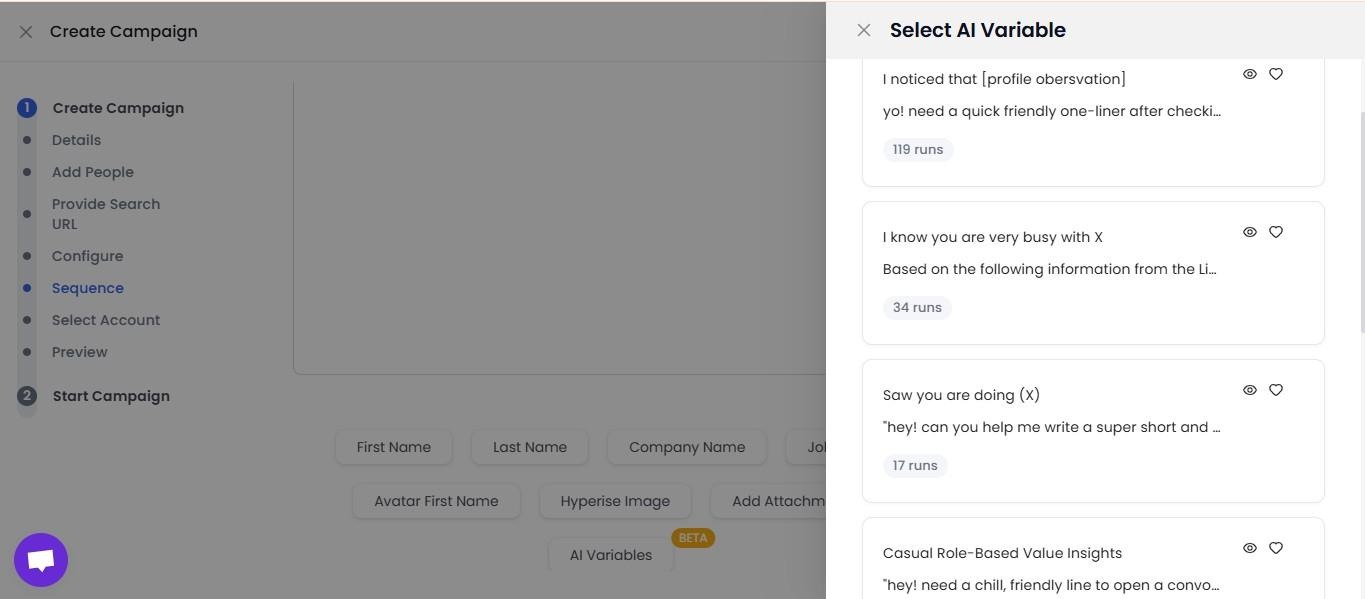
This level of personalization shows your prospects that you're not just sending out generic sales messages but truly care about solving their specific problems.
SalesRobot lets you personalize each message.
And when prospects start engaging, SalesRobot's AI Appointment Setter takes over the conversation, maintaining that same personalized approach while nurturing them toward a meeting.
6️⃣Try LinkedIn retargeting
LinkedIn retargeting is a powerful way to stay visible to your target accounts if they've visited your website or engaged with your content.
By serving ads to people who already know you, you can subtly remind them of your value. You can now retarget website visitors, customer contacts and key named accounts through LinkedIn's advanced targeting capabilities.
It's a simple way to keep a flowing conversation, especially when paired with meaningful, personalized follow-up messages.
7️⃣Track & analyze
You can't improve what you don't measure.
So, track every interaction, whether it's clicks, responses, or engagement rates. The top metrics that matter to marketers include lead quality and MQLs (39%), lead to customer conversion rate (34%), and ROI (31%).
Understanding what's working and what isn't helps you refine your approach.
Oh, and did I tell you?
SalesRobot can do that too!

Conclusion: Is account-based marketing expensive?
Long answer short, yes.
LinkedIn ABM can get expensive and time-consuming due to:
💰Highly targeted ads and premium ad formats,
💰Competition to reach decision-makers, and
💰The need for personalized content and extended campaigns.
But hey, it's nothing to worry about.
You can easily manage it by following these tips:
📌Focus on targeting a select group of high-value accounts that are most likely to convert and generate significant ROI. This way, you're not wasting resources on less promising prospects.
📌Leverage LinkedIn's free tools such as Organic Posts, LinkedIn Groups, and direct messaging. Organic content—like informative posts or updates—engages your target audience without any extra cost. This keeps your strategy budget-friendly.
📌Retargeting ads are usually cheaper since these people already know about your company, making them more likely to buy. It's a smart way to keep the conversation going without breaking the bank.
📌By combining both organic and paid strategies, you can reduce your over-reliance on ads. This approach helps balance costs and keeps your brand visible in a more natural way.
📌Instead of running long, costly campaigns, try shorter ones and test different ads to see what works best. It's all about efficiency—learn quickly what resonates and adjust accordingly.
📌Use bid caps in LinkedIn's auction-based ad system to control the maximum you're willing to pay per click or impression. This helps keep costs manageable.
📌And at last, manage how often your ads are shown to the same people by capping ad frequency. This way, you're not wasting money by bombarding your audience with the same message repeatedly. That's how you save some 💵.
SalesRobot will help you find the right people and send them hyper-personalized connection requests.
And on top of that, it can warm up with your clients and keep your LinkedIn account safe — SalesRobot runs on LinkedIn's mobile app APIs from the cloud (no Chrome extension), works 24/7 even with your laptop closed, and uses dedicated residential IPs to cut ban risk to 0.00001%.
You need to try it out, to believe me.
Don't worry; no credit card details for the first 14-days.
FAQ: Common LinkedIn Account Questions
What does the check mark mean on a LinkedIn message?
A single grey check mark means your message was successfully sent but not yet read. When the recipient's small profile picture appears beside the message, it's been read — but only if both people have read receipts enabled. Read receipts don't apply to InMail.
What happens when you hibernate your LinkedIn account?
Hibernation temporarily hides your profile from all members — even connections — while preserving your data, connections, and messages. Notifications and messages pause, and any active Premium subscription is cancelled immediately. Everything is restored exactly as you left it when you reactivate.
How long can you hibernate your LinkedIn account?
LinkedIn sets no time limit on hibernation — you can keep your account hibernated for weeks, months, or even years. Your profile, connections, and messages stay saved. Just note you must wait 24 hours after hibernating before you can log back in to reactivate.
Can you look at LinkedIn without an account? You can view some LinkedIn content without creating an account, but access is limited. You'll see basic profile information and some posts, but won't be able to view full profiles, connect with people, or access premium features like messaging.
Can I view LinkedIn without an account? Yes, but with restrictions. LinkedIn allows limited viewing of public profiles and company pages without an account. However, for full access to profiles, networking features, and ABM capabilities, you'll need to create a LinkedIn account.
How to view LinkedIn without account? You can browse LinkedIn by visiting linkedin.com and searching for specific people or companies. However, LinkedIn will prompt you to sign up after viewing a few profiles, and many features remain locked without an account.
Can you view LinkedIn profiles without an account? Limited viewing is possible, but LinkedIn restricts access to encourage account creation. For effective ABM and professional networking, having a LinkedIn account is essential.
Thanks for reading!
Do let us know in the comment section below which of the above tips you found the most helpful.
And take care!

Wow your leads by cloning yourself and sending personalized videos and voice notes to each lead on LinkedIn.
If you don't reply to leads within 5 mins, your chances of converting them fall by 50%. Our AI replies on your behalf instantly! (and yes, you can train it)

Don't shoot in the dark. Get detailed analytics on what's working

SalesRobot allows you to invite other team members, so that they can add their LinkedIn Account, run outreach campaigns and get amazing results just like you.
.avif)


Trusted by 4100+ innovative B2B sales teams and lead gen agencies

.avif)

.avif)




.avif)


Heading 1
Heading 2
Heading 3
Heading 4
Heading 5
Heading 6
Lorem ipsum dolor sit amet, consectetur adipiscing elit, sed do eiusmod tempor incididunt ut labore et dolore magna aliqua. Ut enim ad minim veniam, quis nostrud exercitation ullamco laboris nisi ut aliquip ex ea commodo consequat. Duis aute irure dolor in reprehenderit in voluptate velit esse cillum dolore eu fugiat nulla pariatur.
Block quote
Ordered list
- Item 1
- Item 2
- Item 3
Unordered list
- Item A
- Item B
- Item C
Bold text
Emphasis

Superscript
Subscript